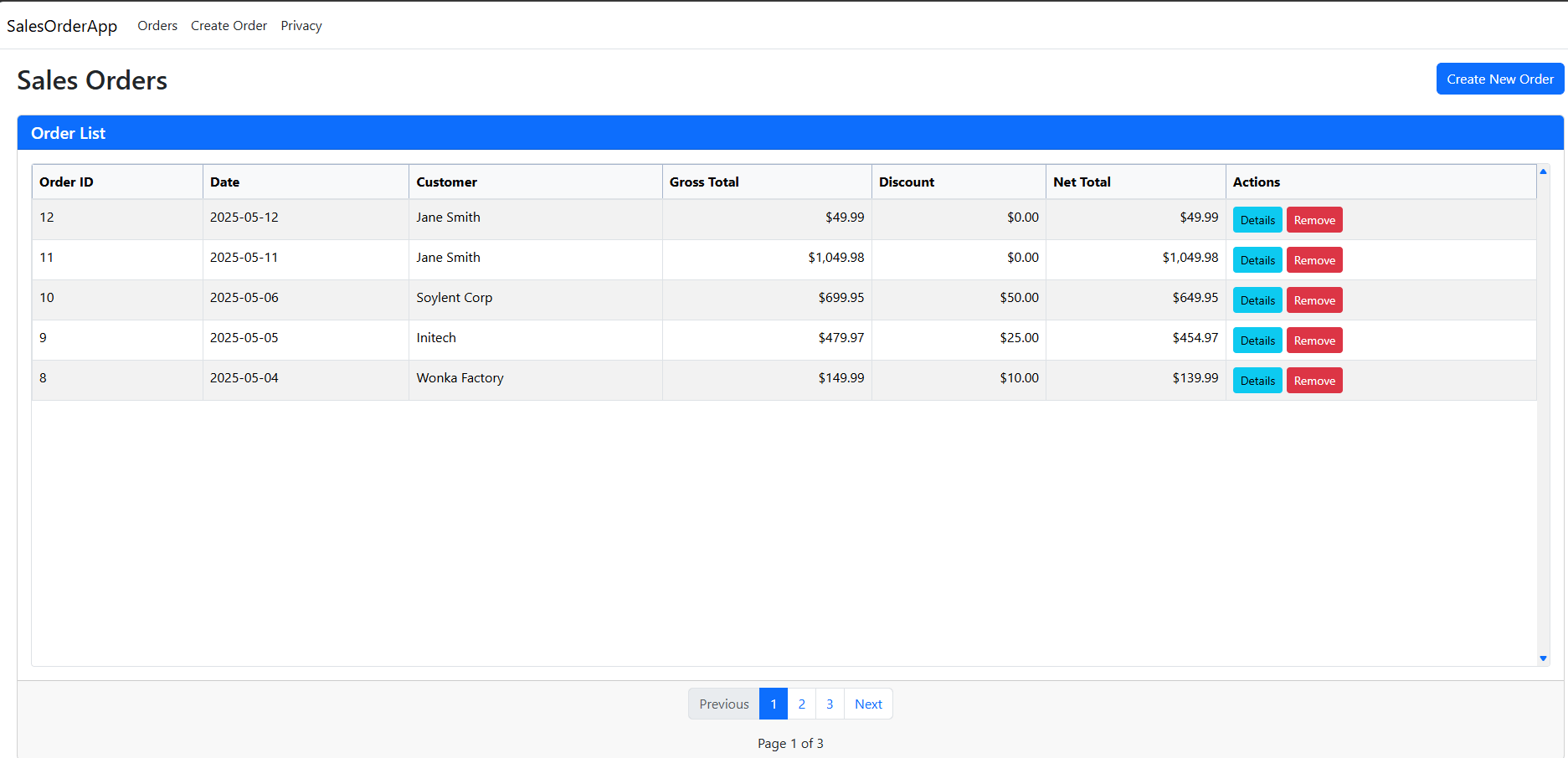
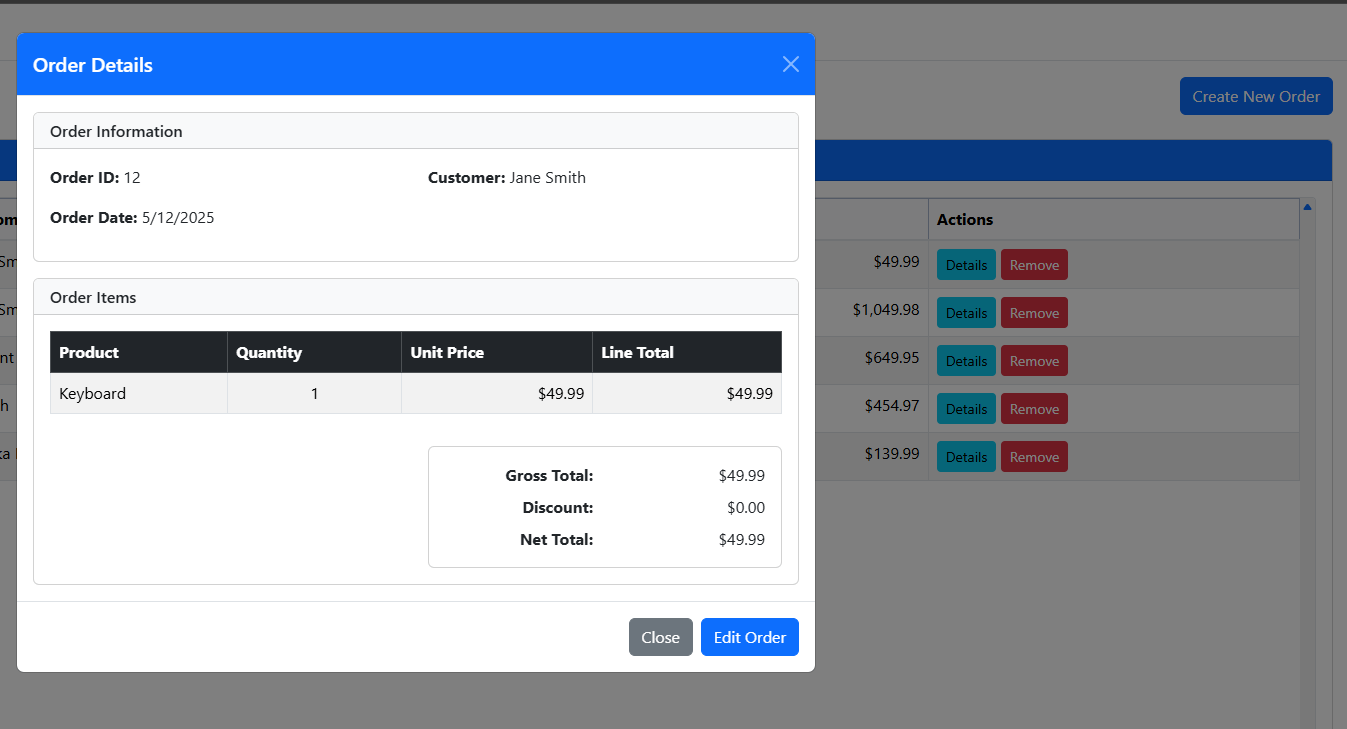
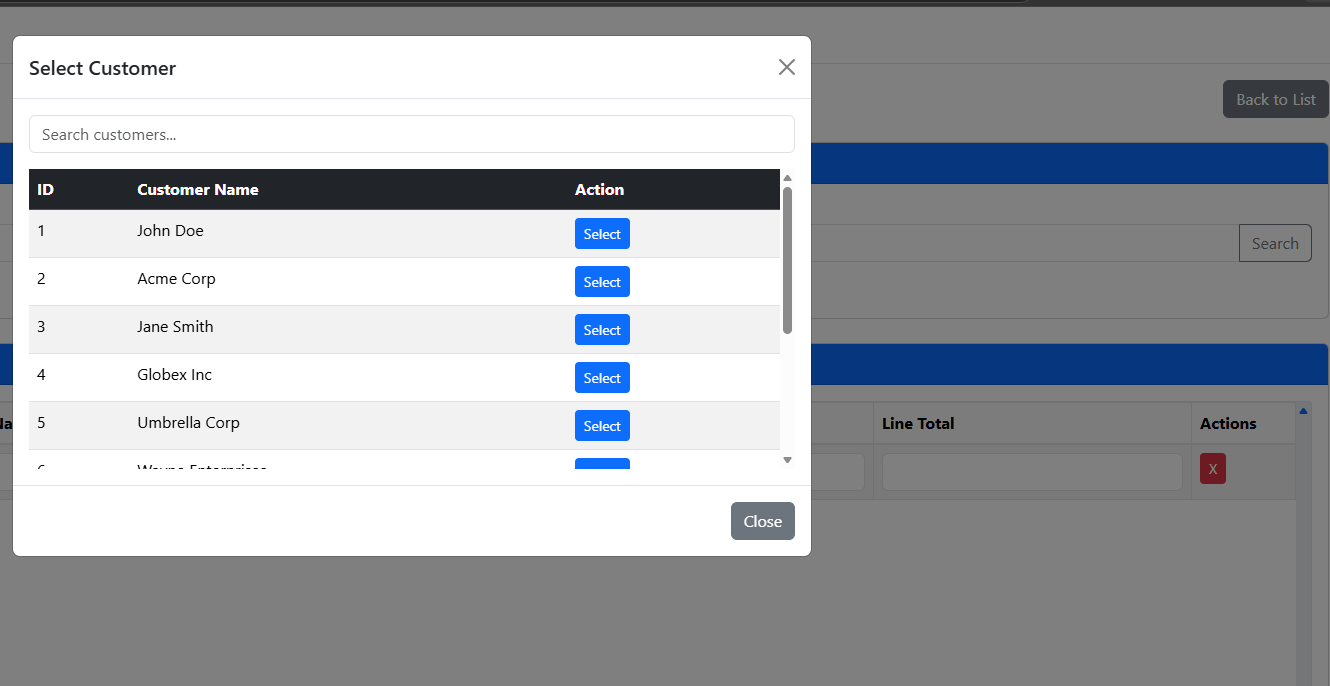
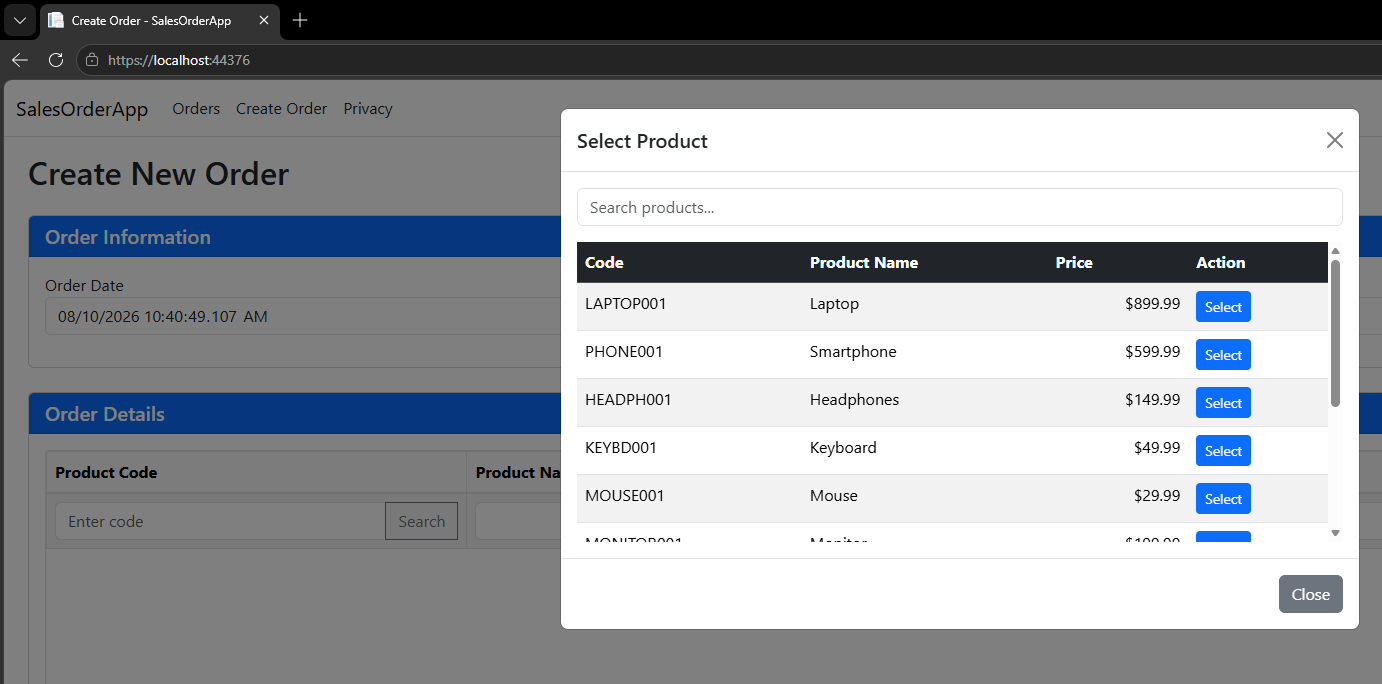
A while back, our business decided to diversify the software development using multiple stacks & against few available options, opted for .Net Core, mainly because it is Microsoft supported platform. As we were always using Oracle products, mainly Oracle Forms & reports, needed a sample project that could be mapped to 50-60% Oracle Forms behavior to address the difficulties our users might face, especially with list of values.
I came across a student who readily accepted our proposal and came up with a wonderful sample, that I am sharing with .Net Core aspirants.
Sample Screenshots
Feel free to clone the repository & use it for your own learning curve. If you have suggestions or comments, do let us know.
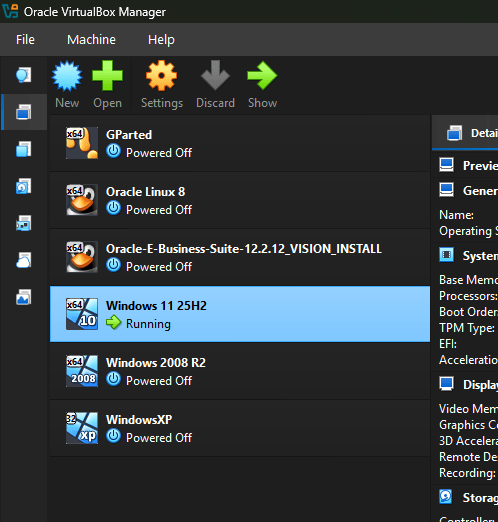
Okay, I use many Virtual Machines, mostly for Sandbox purposes & few out of curiosity.
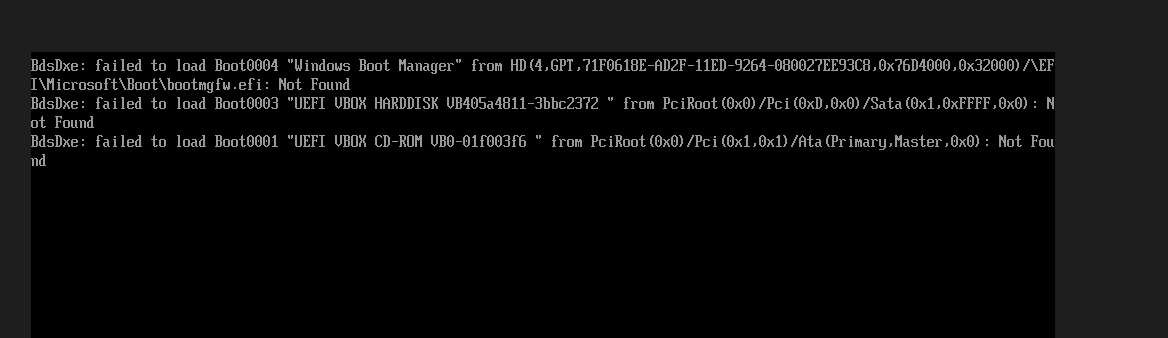
Recently, I ran out of space on my Windows 11 Vdi & had to convert the fixed size Vdi to dynamic to extend the size. As I didn’t want to re-install the OS, I used GParted to resize and rebuild the partitions. Once done, during the booting, I started getting some interesting failure notices, without affecting the normal loading process.
BdsDxe: failed to load Boot0004 "Windows Boot Manager" from HD ....
BdsDxe: failed to load Boot0003 "UEFI VBOX ...."
I did a quick search and couldn’t find a solution immediately and forgot about it until yesterday, when I read about Microsoft’s decision to bring back Taskbar Anywhere feature ;). I wanted to join the insider program again and these messages were quite annoying as I had to reboot the VM multiple times.
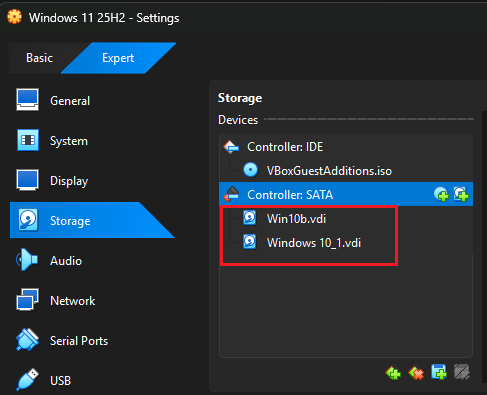
My solution may not be suitable for you, however, giving it a try will not hurt!. I removed both the Hard Disks from the VM and attached them once again. Next reboot was clean, without showing these failure messages.
I was absent for last four months or more from the blogging world. Blame our Oracle EBS 12.2.10 to 12.2.14 upgrade for that. As, Developers like you and me are facing the “imminent” danger of being wiped out by the AI dudes, I wanted to catch up with them before it was too late, in addition to fixing the upgrade mess.
For such a Project, I made a small Powershell script, that generated JSON files against few of existing views. AI generated the Powershell script. I modified the connection strings & executed the script using “Windows PowerShell”. All good and was impressed by the clean code blocks generated by Copilot.
As I often work with Linux servers, had the latest PowerShell pinned to my taskbar & couple of days back, wanted to make some changes to my toy project. Made them, opened up the PowerShell 7.6.3 shell and tried to execute the script and was slapped with the error:
Then my AI dude (Copilot) churned out few TONs of suggestions until I gave up hurting my fingers further. Moved to Google Gemini & as usual, gave me hope and I ended up with another N number of experiments.
Throughout my development career, blessings came in the shape of blog posts, accidental findings… & this time was no different. After losing hopes on both the AI assistants, for some unknown reasons, I opened up “Windows PowerShell” and tried to execute the same script that was working previously and was not working on PowerShell 7.6.3!
Now, I have something to work on. Gemini explained me about the differences between the Oracle’s Managed Data Access dll and the 7.6.3 .Net Core architecture. I copied the Managed Data Access Core dll from one of my recent .Net Core Web API projects (Don’t get confused because both DLL files “look” the same), modified the PowerShell script to check its’ own version before continuing with the script. Now, my script works from both Windows PowerShell and PowerShell 7+ environments.
Fixed PowerShell script, enjoy :)
# Load Oracle Managed Data Access assembly
# Get the current running PowerShell version
$psVersion=$PSVersionTable.PSVersion
# Define the target comparison version (7.6.3)
$targetVersion=[version]"7.6.3"
if($psVersion-ge$targetVersion){
Write-Host"PowerShell version is $psVersion (7.6.3 or above). Loading local DLL..."-ForegroundColorGreen
One of the major concerns that we had while upgrading Oracle EBS R12 version from 12.2.10 to 12.2.14 was how to bring the Oracle ORDS instance under the same SSL hood as we didn’t have a plan to have another server dedicated for ORDS. Our current setup is like below, single instance of Oracle EBS R12 12.2.14 SSL enabled and the ORDS instance hosted from the same server using Apache-Tomcat, that listens to default 8080 port.
The business requirement is pretty straight forward. Develop using APEX, access it from the EBS environment, doesn’t mean we are not going to have standalone APEX applications as extensions for EBS.
Now, comes the real issue. How to bring both instances to the same SSL hood? For example, EBS instance is accessed from the URL https://hostname & we must ensure that the ORDS instance also should be accessible from the same hostname like https://hostname/ords
Please note, none of the below hacks are advisable for a PRODUCT environment. While the hack perfectly fits the TESTING environments, the resources for EBS could be severely compromised when the APEX instance becomes hungry for more resources in the form of processing and memory. Follow the Oracle recommendations always for hosting ORDS from a different server. I will post comprehensive suggestions compiled by AI by the end of this post. This hack was tested against an instance of Oracle EBS R12 12.2.14 & should work with R12 12.2.x versions. Point to interest, version 12.2.14 is the initial version of R12 that tightly integrates APEX, hence do not expect your applications start enjoying the same fruits, if you are on a previous release. Regardless, the reverse proxy method should work.
Let us hack
As application manager user, shutdown the application instance and run the below command
Once we have the template name, for this case, “oracle_apache_ssl_conf_FMW.tmp”, we should copy this template to $FND_TOP/admin/template/custom folder. If there is no custom folder, create one. Please note, “custom” is the only allowed name and case sensitive. Always read the header area of the template, that will help you to understand whether the template will be merged during the next autoconfig run.
It’s time to run “autoconfig“. Please make sure that all the above exercises were performed on the run file edition environment.
Once the autoconfig completes “successfully”, quickly ensure the OHS instance has the “oracle_apache_ssl.conf” file amended with custom template entries.
That means your custom template was merged and you can proceed to next configuration modification. This time we will be making a change to Apache-Tomcat web server. Switch to your Apache-tomcat installation folder, for example ‘/u01/apache-tomcat/conf’, make a backup for the file server.xml. Now, edit the server.xml file and replace the block that looks like this
<Connectorport="8080"protocol="HTTP/1.1"
connectionTimeout="20000"
redirectPort="8443"/>
with the below
<Connectorport="8080"protocol="HTTP/1.1"
connectionTimeout="20000"
proxyName="fullyqualifieddomainname"
proxyPort="443"
scheme="https"
secure="true"
SSLEnabled="false"
URIEncoding="UTF-8"/>
Save the configuration file. Start EBS application tier and Apache-Tomcat server sequentially. You should able to access your ORDS instance by calling https://hostname/ords now. In addition you may able to make these entries using enterprise manager OHS plug-ins.
By bringing the ORDS instance under the same SSL hood, you are going to avoid multiple access issues, one of them being the “mixed content” error when the EBS tries to access the APEX applications using ORDS that is HTTP. Although this hack is to survive future autoconfig and patching cycles, NOT AT ALL recommended. In addition, such a setup could cause continuous forms disconnections also.
Please consider the suggestions compiled by one of the major AI agents, as listed below.
Prompt
Currently we are hosting both ORACLE EBS R12 and APEX under the same hostname. Can you find Oracle’s recommendations for independent hosts for each product? Further help me to understand the implication incase if we continue with the current setup, achieved by modifying ssl.conf using template for reverse proxy. Maximize your explanations, recommendations and assessment.
AI response
Oracle’s official guidance on deploying E-Business Suite (EBS R12) and Oracle Application Express (APEX) emphasizes separation of concerns in architecture. Let’s break this down into recommendations, implications, and strategic assessment.
🔹 Oracle’s Recommendations
Independent Middle Tiers: Oracle recommends deploying APEX and EBS on separate middle-tier hosts.
EBS R12 relies on Oracle WebLogic + Forms/Servlets stack.
APEX runs on Oracle REST Data Services (ORDS), typically deployed on a standalone WebLogic, Tomcat, or Oracle HTTP Server.
Reverse Proxy Usage: Oracle supports reverse proxying (via Oracle HTTP Server or Apache) but recommends distinct hostnames or subdomains (e.g., ebs.company.com vs. apex.company.com) for clarity, isolation, and SSL management.
Security & Maintainability: Oracle’s technical papers highlight that mixing workloads under one hostname complicates SSL termination, cookie/session management, and audit compliance.
🔹 Implications of Current Setup (Same Hostname via ssl.conf Reverse Proxy)
Area
Risk/Implication
Security
Shared hostname increases risk of cross-application cookie leakage, session hijacking, and difficulty in applying distinct SSL/TLS policies.
Audit & Compliance
Regulatory audits (SOX, GDPR, VAT compliance) often require clear segregation of application boundaries. Mixing under one hostname weakens traceability.
Operational Complexity
Reverse proxy rules in ssl.conf must be carefully maintained. Any misconfiguration can expose APEX apps through EBS paths or vice versa.
Performance
Both stacks compete for network and SSL termination resources. Troubleshooting latency or bottlenecks becomes harder.
Patching & Upgrades
EBS patches (WebLogic, Forms) and APEX/ORDS upgrades have different cycles. Sharing a hostname risks downtime overlap and dependency conflicts.
Disaster Recovery
Hostname-level coupling complicates failover. Independent hosts allow selective DR strategies (e.g., APEX-only failover without impacting EBS).
Easier to scale APEX independently (APEX often grows faster with custom apps).
Supports hybrid DR strategies and microservices-style extension of EBS.
🔹 My Assessment
Continuing with the same hostname setup is technically feasible but audit-unfriendly, harder to maintain, and risk-prone. Oracle’s stance is clear: separate middle tiers and hostnames provide cleaner architecture, stronger compliance, and operational resilience.
I’ve created a custom top for APEX integration with Oracle EBS R12 12.2.10 recently & by mistake choose 5001 instead of 50000+ for application id. Then I wanted to do it correct and proceeded with the documented procedures.
perl adDeregisterCustomProd.pl
This script errored out as the application id was less than 20000 (unfortunately, I didn’t copy the exact error messages). So, started a session with gemini3, that I recently subscribed. Well, although the AI helped to a great extend, finally I had to refer a blog that helped me to resolve the related issues & finally come up with a clean context file.
Lets’ see how it works. Shutdown the application instance & start deleting the custom top specific entries from related tables. As user “apps”
DELETE FROM fnd_product_installations WHERE application_id = 5001
/
DELETE FROM fnd_application_tl WHERE application_id = 5001
/
DELETE FROM fnd_application WHERE application_id = 5001
/
DELETE FROM fnd_oracle_userid WHERE oracle_id = 5001
/
commit
/
Now, delete the entry for your custom application from fnd_oam_context_custom, a step that shouldn’t be missed. Use the select statement to find out specific information about your custom application
DELETE FROM fnd_oam_context_custom WHERE upper(oa_var) LIKE '%XXAPEX%'
/
COMMIT
/
Now, as Oracle user “system” you need to drop the custom schema. I wanted to drop the custom schema “XXAPEX”
SELECT editions_enabled FROM dba_users WHERE username = 'XXAPEX'
/
DROP USER XXAPEX CASCADE
/
Now, remove the physical path for the custom application
rm -rf $XXAPEX_TOP
Usually, one should proceed with auto config and do an adop fs_clone to replicate the changes while using dual file systems. For me, after auto config, I was still seeing the custom top entry within the context file & no questions will help the AI to pinpoint my issue. Suggestions after suggestion auto config recreated the entry for the custom top inside the context file.
I gave the AI some rest time & started scavenging through blogs & came across the below one
Here the blogger is dealing with a situation that was raised while using “adDeregisterCustomProd.pl”. Fortunately, the blogger has copied the entire log of the activities and I found a very interesting entry
XXAR entry in topfile.txt is removed succesfully ..!
Well, that was it! I hurried to AI once again and asked for the physical location for the topfile.txt & removed the custom top entry from the list. Manually deleted the line from context file & ran auto config once again on “run” environment. Once the config completed, there were no more entries for the custom application to be found.
As we are using SSL for the EBS instance, restarted the application and proceeded with fs_clone. I am noting the fs_clone issues while using SSL to avoid another post. If you initiate the fs_clone without the application server being up using SSL, you are prone to hit the error
[user: applmgr] [VirtualHost: main] (13)Permission denied: make_sock: could not bind to address [::]:443
The solution is simple, start the application server if it was shutdown & try fs_clone once again.
After some thoughts, I’ve decided to retire Google Ads from my blog as these auto ads started messing up with the content by overlapping. Years back, I opted to go for a hosted blog, hoping the ad revenue could be channeled for supporting education. Well, I think I have to find alternative means to support my cause :))
Back to the subject. Yesterday (12th Nov, 2025) I disabled Auto Ads on my Google Adsense and few minutes later, started a new post. Unfortunately I was presented with an error “TypeError: Class constructors cannot be invoked without ‘new’ at gt“
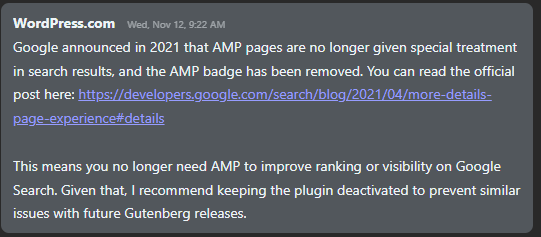
As the error was too generic, I rushed to raise a support ticket with WordPress & the issue was resolved by a “Human Agent” by disabling AMP plug-in that has a conflict with their Gutenberg plug-in!
The agent said, as Google has decided not to give AMP pages special treatments & the AMP plug-in was the culprit!
So if you are also clueless what went wrong all of a sudden, a good start will be by disabling the AMP plug-in. Hope this helps few out there! Happy blogging.
KB5066835 update fails to install. It just keeps on failing to install after multiple attempts. One of the most efficient methods to resolve this problem quickly is to rename the Windows\SoftwareDistribution folder & run the Windows update once again.
Steps
Stop the Windows Update Service from Windows Services
Stop BITS
Go to Windows folder, rename SoftwareDistribution folder to softwaredistribution.old or softwaredistribution.littlejoe (up to you). You may asked for Administrative confirmations.
Restart Windows
Check for updates or click the retry button and everything should be fine now.
Applies on both Windows 10 and Windows 11 distributions while the update with issues is specific to Windows 11.
Even Oracle’s developers could miss few details and end up with nasty bugs at customers’ end. Would they fix them against customer reports? Not always…This leaves few of the bugs open for years.
The perfect example is Oracle Accounts Payable Invoice batches entry form. If the Supplier site doesn’t have a valid payment method set, the form will show you a WHEN-VALIDATE-ITEM error message by the status line and will not let you proceed further.
Simple, efficient and system generated! Nothing else to be done. Well, if you are stuck, open the supplier details and check whether the party has a default payment method set, if yes, go to the supplier site record for the organization where the error happens set up the payment method. For other errors, Oracle might have some other error messages ;)
This is our 13th year with Oracle EBS R12 and we hardly use any standard reports. Recently, after implementing Tax for our Bahrain operations, I was asked to modify the Customer SOA accommodating the tax requirements.
I opened up the view, that the implementation partner made, and found that the view had unnecessary joins and grouping using names for transactions and other. I changed the base query with the below.
Select
a.org_id, a.payment_schedule_id,
a.amount_due_original, a.amount_due_remaining, a.class, a.invoice_currency_code, a.customer_id, a.customer_trx_id,
a.amount_line_items_original, a.amount_line_items_remaining
,a.tax_original, a.tax_remaining, a.discount_original, a.discount_remaining
,a.trx_number,a.trx_date, b.purchase_order, b.interface_header_attribute1 order_number, interface_header_attribute2 order_type,interface_header_attribute6 order_line_id
,c.header_id order_header_id
,sum(a.amount_due_remaining) over (order by a.payment_schedule_id asc) running_total
from AR_PAYMENT_SCHEDULES_ALL a
left outer join RA_CUSTOMER_TRX_ALL b on a.CUSTOMER_TRX_ID = b.CUSTOMER_TRX_ID
left outer join oe_order_lines_all c on b.interface_header_attribute6=c.line_id
where
1=1
and a.org_id = 285
and a.customer_id=(select customer_id from ar_customers where customer_number='227634')
--and a.amount_due_remaining > 0 --uncomment for unmatched invoices only listing
order by a.payment_schedule_id
/
Later a new view was created like following:
CREATE OR REPLACE VIEW OMSCUSTSOA_V
AS
Select
a.org_id, a.payment_schedule_id,
a.amount_due_original, a.amount_due_remaining, a.class, a.invoice_currency_code, a.customer_id, a.customer_trx_id,
a.amount_line_items_original, a.amount_line_items_remaining
,a.tax_original, a.tax_remaining, a.discount_original, a.discount_remaining
,a.trx_number,a.trx_date, b.purchase_order, b.interface_header_attribute1 order_number, interface_header_attribute2 order_type,interface_header_attribute6 order_line_id
,c.header_id order_header_id
from AR_PAYMENT_SCHEDULES_ALL a
left outer join RA_CUSTOMER_TRX_ALL b on a.CUSTOMER_TRX_ID = b.CUSTOMER_TRX_ID
left outer join oe_order_lines_all c on b.interface_header_attribute6=c.line_id
where
1=1
/
Subsequently, for any customer, the view is referred in the final query.
Select a.*, sum(amount_due_original) over(order by payment_schedule_id asc) running_total
from OMSCUSTSOA_V a
where
1=1
and a.org_id=285
--and a.amount_due_remaining > 0 --this condition will fetch open invoices that are yet to be matched
and a.customer_id=(select customer_id from ar_customers where customer_number='227634')
order by payment_schedule_id
/
Did you start experiencing a popup at random intervals asking you to sign-in while using Microsoft Office products? Ironically, you are not a 365 Office customer!
As a business, we buy OEM Office products with purchase of every new PC and maintain multiple versions. We’ve the Office updates enabled for all users, and recently (and luckily) I started experiencing the random sign-in popup while using Microsoft Outlook (office suite). To my utter dismay, I realized that none of the accounts, be corporate or Microsoft live/outlook were accepted for this purpose.
The error is always “This username may be incorrect. Make sure you typed it correctly. Otherwise, contact your admin” and definitely trying to sign on to a 365 account!
There are dozens of inquiries with Microsoft Answers about this behavior and sets of instructions, most of which were suggesting to disable Autodiscover by altering the registry.
I was able to fix my issues by altering the registry (don’t know whether really required) and dropping the existing Outlook profile. Let me walk you through the procedures, hope it might help you also!
Modify the registry. Please note, if you are not familiar with registry modifications, kindly seek assistance from someone who knows what he/she is doing.
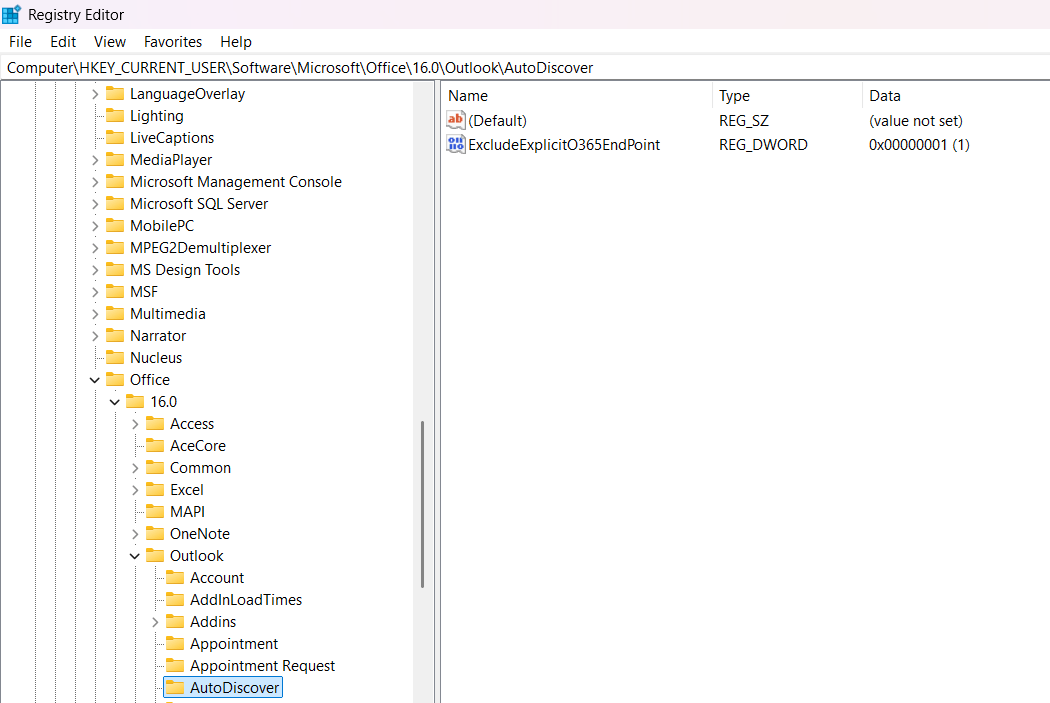
Open Registry Editor and browse to “Computer\HKEY_CURRENT_USER\Software\Microsoft\Office\16.0\Outlook\AutoDiscover”. Add a DWORD 32-bit key “ExcludeExplicitO365EndPoint” with value “1”. Please note based on the version of your office product, the version number might change. Adjust the path accordingly.
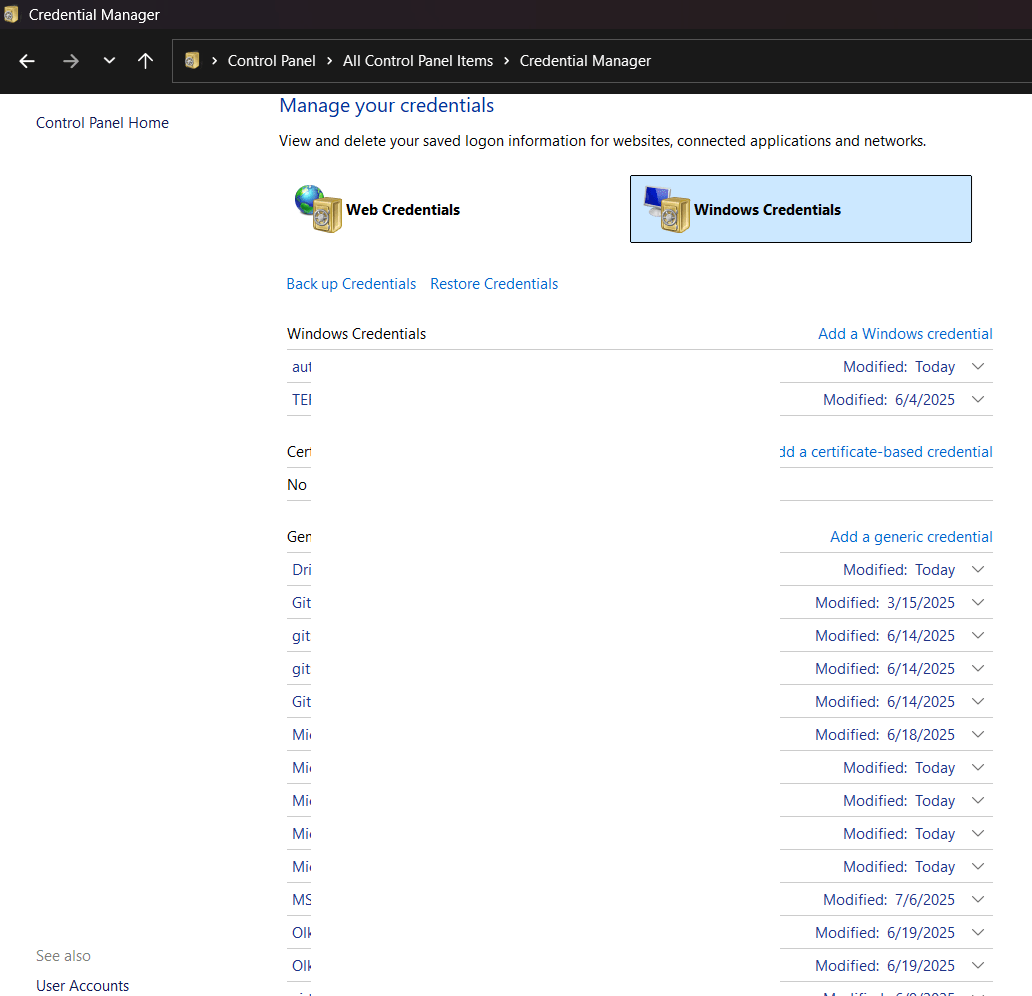
Using Control Panel, access Credential Manager->Windows Credentials & remove all entries you could find for the Microsoft account that you have used for registering your OEM copy of the Office software. Once again, whether this has any significance, I am not sure. I did this as a part of one of the suggestions from Microsoft Answers.
Remove your existing Outlook profile. Please make sure that you will take backup for your PST files if your email settings are configured for downloading all messages to local personal folders.
Restart your computer.
Create a new profile using Control Panel->Mail without adding an email address. Start outlook and follow the wizard. Do not forget to check the box “Let me set up my account manually”. Below 2 images were copied from https://www.gmass.co/blog/outlook-smtp/ as I forgot to save the images while I was setting up my account.
Please note, the whole exercises mentioned here are for a Local exchange server set up. Select “Exchange” if you are using Exchange Server 2016 or later. Exchange Server 2019 should be the final edition of mail server Microsoft is planning to support on-premise.
Follow the Wizard and you should be connected without troubles, especially if you are connected to the corporate network directly or through VPN. Over the internet, you may have to try multiple times as the “Autodiscovery” could interfere with the attempts.
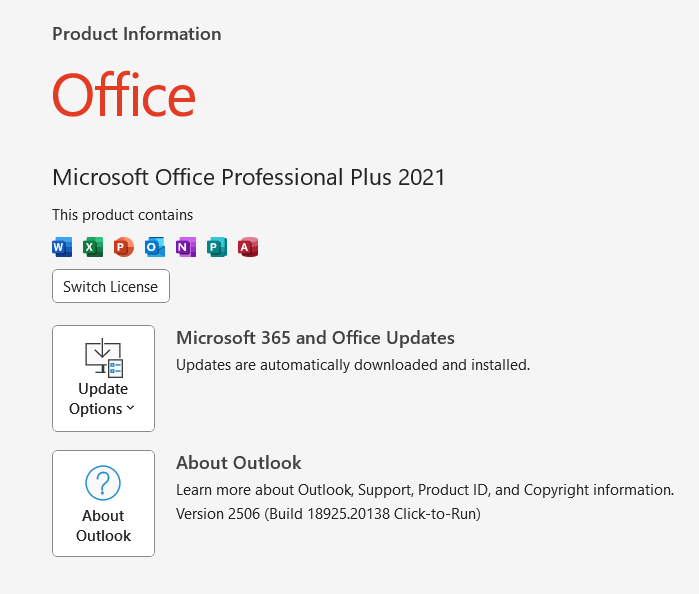
Once the account is added, please confirm few details. For the Office version 2021 the top right corner which used to show your Microsoft account details should start showing your corporate account details
File->Office Account area also start showing your Corporate account details instead of Microsoft account(s)